
When executives ask about the cost of Managed IT Services, they’re usually looking for a number they can confidently budget against. That’s fair.
A fully managed plan is typically priced between $100 and $250 per user per month.
That range assumes a fully managed operating baseline, not break-fix support, covering helpdesk, proactive maintenance, cybersecurity management, and predictable monthly billing.
What it doesn’t explain is value, which is where most MSP comparisons fall apart.
“The biggest driver isn’t headcount,” says Faizal Jessani, CRO at Sirkit. “It’s the scope of responsibility you’re asking your MSP to own, including support, cybersecurity, Microsoft 365 administration, plus the strategic and compliance work that comes with it. When your IT partner operates like your vCISO and a business advisor, you’re not buying tickets. You’re buying outcomes, risk reduction, and accountability.”
What Managed IT Services include (and what actually drives cost)
Managed IT Services are delivered as an ongoing subscription, in which an MSP assumes defined day-to-day IT and security responsibilities within an agreed scope and service levels.
Common inclusions
Most managed plans include some version of:
- Helpdesk and end-user support
- Endpoint and infrastructure management (monitoring, patching, routine maintenance)
- Microsoft 365 administration (user lifecycle, email, collaboration tools)
- Identity and access management (baseline policies and access controls)
- Vendor coordination (ISP, telecom, key software vendors)
- Reporting and documentation (ticket trends, asset inventory, roadmaps or QBRs)
Common exclusions (often priced separately)
Many providers exclude or separately price:
- New hardware purchases and office buildouts
- Major projects such as migrations or network redesigns
- After-hours coverage outside business hours
- Specialized compliance programs requiring custom work
- Advanced security, including Microsoft 365 MDR (Managed Detection and Response) penetration testing. and breach response
- Managed backups, including Microsoft 365 data and servers
Exclusions aren’t the problem. Unclear exclusions are. For executives, unpredictable scope leads to unpredictable spend and often a bigger concern than the monthly fee itself.
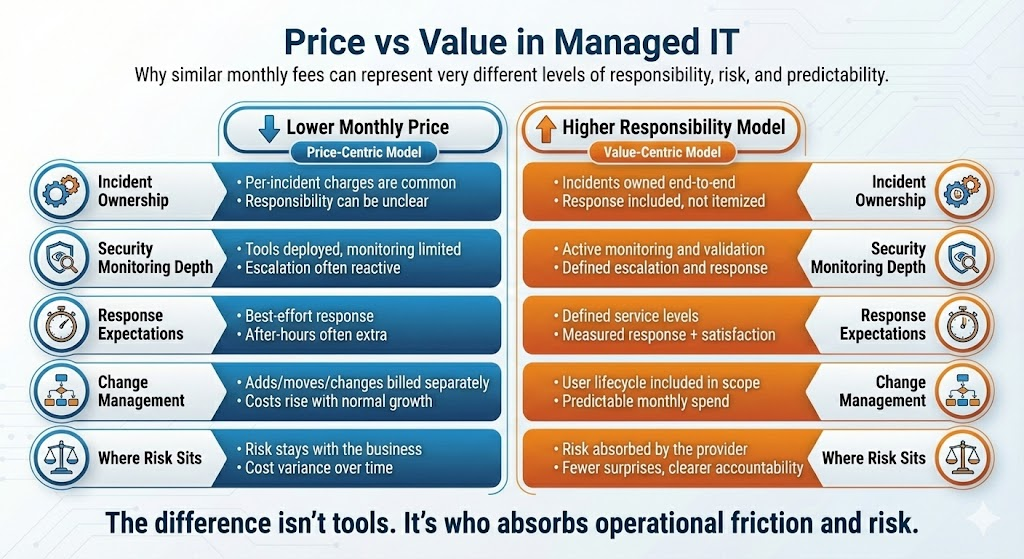
Price vs value: how executives should evaluate managed IT spend
From a leadership perspective, the real question isn’t “What does managed IT cost?” It’s “What business risk does this cost actually absorb?”
A lower monthly fee often means:
- Narrower responsibility
- More exclusions
- Less proactive oversight
- Slower or weaker incident response
- Essential or reduced security protection
A higher fee is justified only when it funds measurable operational ownership, such as faster response times, a proper compliance program, enhanced security and monitoring across all platforms, including cloud, and clear accountability during incidents.
This distinction between price and value is central to how Sirkit frames managed services discussions: pricing reflects responsibility, not just access to tools.
Managed IT Cost Ranges by Company Size
The ranges below reflect common packaging for organizations seeking consistent support and a defined security baseline. Actual pricing still depends on scope and complexity.
| Company Size (Employees) | Common Monthly Range | Typical Pricing Method | Biggest Variables |
|---|---|---|---|
| 25–49 | $3,500–$12,000 | Per-user or flat-rate | Security scope, Microsoft 365 complexity |
| 50–99 | $8,000–$25,000 | Per-user or flat-rate | Multi-site support, after-hours coverage |
| 100–249 | $18,000–$60,000 | Per-user, flat-rate, or hybrid | Standardization, identity controls, compliance |
| 250–1,000+ | $50,000–$250,000+ | Hybrid and co-managed | Governance, change management, SOC depth |
For executives, these ranges matter less as benchmarks and more as indicators of how much responsibility is being transferred out of the business.
“As a CPA, I look at the numbers first,” adds Faizal. “But in managed IT, the numbers only mean something when you connect them to operational reality. The monthly rate reflects what’s being managed, what’s being monitored, what’s being secured, and who owns the outcome when something fails.”
For example, a proposal may look cheaper at $6,000 per month, but once after-hours support, onboarding and offboarding, and key security layers are added, real spend often lands closer to $8,000–$9,000.
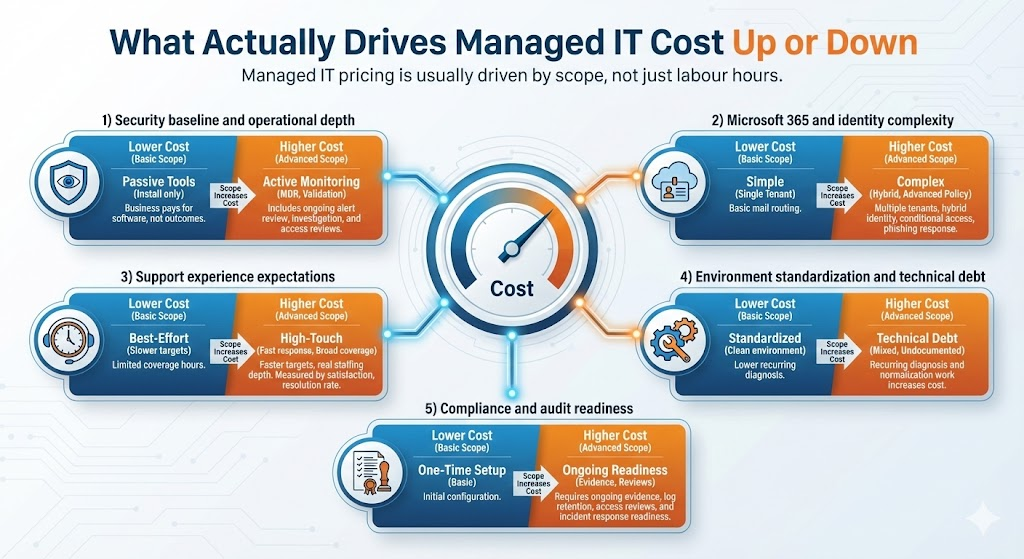
What Actually Drives Cost
Managed IT pricing is driven by scope, not labour hours.
1) Security baseline and operational depth
Plans that include active monitoring, including cloud, cost more than plans that simply deploy tools. Price increases when the scope includes managed detection and response, alert investigation, and routine security validation.
2) Microsoft 365, Azure and identity complexity
Costs increase with multiple tenants, hybrid identity environments, conditional access design, virtual infrastructure, and ongoing policy management.
3) Support experience expectations
Faster response targets and broader coverage hours require real staffing depth. Metrics executives should expect to see are average time to answer, same-day resolution rates, and customer satisfaction tracking.
4) Environment standardization and technical debt
Standardized environments cost less to support. A mix of vendors, platforms, and undocumented systems increases costs due to recurring diagnostic and normalization work.
5) Compliance and audit readiness
Compliance adds cost when it requires ongoing evidence, not one-time setup — such as log retention, access reviews, configuration checks against best practices, and incident readiness.
The Right Question to Ask Before Selecting an MSP
Two providers can quote similar numbers and deliver very different experiences. One optimizes for price. The other optimizes for responsibility. Over 12 to 24 months, the financial gap often narrows. The operational gap usually doesn’t.
A practical next step:
Before comparing proposals, write down three things you care most about:
- How incidents are handled when they matter
- How predictable your IT spend needs to be
- Where security and compliance responsibility should sit
Use those answers to evaluate every proposal. The right model becomes obvious quickly.