
At 10 employees, a few quick fixes and “we’ll deal with it later” habits can keep things moving, until you hit the point where managed IT services become the difference between scaling smoothly and constant firefighting.
The real cost isn’t just technical, it shows up as lost revenue when systems go down, delivery delays customers actually feel, and leadership time pulled into firefighting instead of running the business, making predictable IT spend harder to maintain.
Resilient IT isn’t about adding more tools or chasing the newest security product. It’s about building an environment that keeps working when something breaks, when a key person is away, when a vendor changes terms, or when a security incident hits. It also means scaling without every change turning into a fire drill.
What “resilient IT infrastructure” really means
Resilience is the ability to maintain operations through disruption, then recover quickly without chaos. In plain language: problems still happen, but they don’t take the business down with them.
For most organizations, resilient IT comes down to five outcomes:
- Availability: Work continues even when a system fails.
- Recoverability: Data and services can be restored within defined targets.
- Security: Common attack paths are blocked or contained.
- Scalability: Growth doesn’t force constant redesign.
- Supportability: Issues are resolved quickly with clear ownership.
Here’s a practical test leaders immediately understand: if your key IT person is away for a week and operations slow down, resilience isn’t a technical gap. It’s a business gap.
Start with an inventory and baseline
Before you standardize anything, you need clarity.
At minimum, document three things: what you run (devices and key systems), who can access it (users, admins, service accounts), and what matters most (critical apps, sensitive data locations, top risks)—the same basics now reflected in stricter cyber insurance application requirements.
With a baseline in place, you can finally standardize without guessing. From there, the highest-leverage move for most organizations is tightening identity, because access is where day-to-day work and day-one risk overlap.
Design around identity first
In most modern organizations, Microsoft 365 and cloud apps are the new office. Identity is the front door, which means resilience often starts with access control, especially with today’s cybersecurity insurance expectations.
Set access standards that are easy to enforce
Start with a few policies that remove the most common failure points:
- MFA for all users, not just admins
- Conditional access to block risky sign-ins and untrusted devices
- No local admin by default, with an approved elevation workflow when needed
- Separate admin accounts from daily accounts for privileged users
- Quarterly access reviews for role changes, contractors, and dormant accounts
Consistency here pays off twice: it reduces risk, and it makes troubleshooting faster because your environment behaves predictably.
Make offboarding a security control
Offboarding is one of the most overlooked resilience controls. When access lingers in email, OneDrive, shared folders, or third-party tools, the business carries risk long after someone has left.
A resilient offboarding process should:
- Disable sign-in quickly and confirm it
- Transfer mailbox/OneDrive ownership and key shared resources
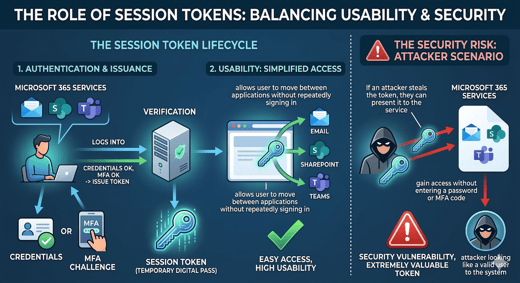
- Revoke sessions/tokens to cut off access from personal devices
- Document closure so HR and leadership can verify it’s complete
Strong identity controls reduce the odds of a serious incident. Backups are what keep an incident from becoming a business interruption when something still goes wrong.
Backups still matter (and Microsoft 365 still needs them)
Cloud uptime is not the same thing as backup. And, retention is not the same thing as recovery.
Many organizations assume Microsoft has them covered, until they need a point-in-time restore after accidental deletion, ransomware, malicious changes, or a retention gap.
Resilient backups start by defining two targets:
- Recovery Point Objective (RPO): how much data you can afford to lose
- Recovery Time Objective (RTO): how quickly you need to be back online
Without RPO and RTO, “we have backups” is vague and rarely holds up under pressure.
Most organizations should focus backups around the tools employees use every day:
- Email (including shared and executive mailboxes)
- OneDrive
- SharePoint
- Teams (files, and messages if required for compliance), especially as Microsoft Teams updates can affect how people collaborate and where data lives
When those are protected properly, you remove one of the biggest business continuity weaknesses in growing organizations.
Standardize endpoints to keep support predictable
At 30+ employees, “every device is different” becomes a tax on productivity. It slows support, complicates security, and makes patching inconsistent.
It also shows up in the employee experience: more random issues, slower onboarding, and unnecessary downtime that is frustrating.
A resilient endpoint standard includes:
- A defined hardware lineup IT can support well
- Device management (policy, encryption, updates, app control)
- Full-disk encryption on laptops
- Patch management for OS and key apps
- Endpoint protection with monitoring and clear escalation paths
The goal is simple: reduce the attack surface and contain issues quickly when they happen.
Email, collaboration, and operational continuity
With endpoints under control, the next priority is protecting the tools that keep the business moving day to day.
Email and collaboration are where work happens, so resilience here is less about “more IT” and more about clear standards, tight sharing rules, and documentation that holds up when something goes sideways.
Keep day-to-day work stable
- Harden email against phishing (links, attachments, impersonation)
- Set clear external sharing rules for SharePoint and OneDrive
- Keep Teams/SharePoint structured so files don’t sprawl or get lost
- Align retention and legal hold settings to business needs (not defaults)
Make the environment supportable under pressure
- Maintain current network and ISP details, including failover
- Store admin access procedures securely and keep them up to date
- Track vendor contacts and renewals for critical platforms
- Maintain simple recovery runbooks for common incidents
- Keep a change log so issues can be traced to recent updates
Prove it works with regular testing
- Run quarterly backup restore tests
- Do phishing simulations and training on a set cadence using employee cybersecurity training best practices to reinforce building a security-first culture
- Hold an annual incident-response tabletop with leadership
If you don’t test it, you don’t really have it.
A practical 7-step blueprint
If you want a simple way to turn “we should improve our IT” into real progress, this is it.

The steps are ordered intentionally: get visibility first, lock down access next, protect data, then standardize the systems that cause the most support and security issues. Work through them in sequence and resilience becomes a byproduct of good operations.
- Build baseline inventory + top risks
- Standardize identity: MFA, conditional access, admin separation
- Define RPO/RTO and implement backups (including Microsoft 365)
- Standardize endpoints, patching, encryption
- Tighten email security and sharing rules
- Document essentials and test restores quarterly
Track a scorecard so resilience is measurable
Resilience doesn’t come from one big project. It comes from getting the fundamentals right and improving them steadily as you grow.